SharePoint Conference 2012 in Las Vegas report part7


Hi friends.

The Conference is over for this time, but I just wanted to report one last time on the downside of the event for us Europeeans at least…the travelling…
My friday/saturday went like this:
(4:30 AM Las Vegas time)
0:00 hrs – Wakeup call from the Mandalay Bay lobby.
0:30 hrs – Checkout and can to McCarran Airport.
1:00 hrs – Checkin, got the bag checked by a nice lady from United, thanks to her, I could get away with quite a lot of overweight.
1:30 hrs – After security and the tram over to D terminal, I got a nice cup of Gingerbread Latte at Starbucks followed by an American breakfast with bacon, eggs and hashbrowns.
(7:35 AM)
3:35 hrs – Takeoff to Newark Airport.
8:35 hrs – Touchdown at Newark Airport.
9:00 hrs Lunch at Smack Burger…and some last minute shopping to the kids.
(14:20 AM)
10:20 hrs – Takeoff to Stockholm Sweden.
18:30 hrs – Touchdown at Arlanda Airport Stockholm Sweden.
(8:00 AM Stockholm time / 12:00 AM Las Vegas time)
19:30 hrs – Arrived at home

About 14 hours more to stay awake until it’s time for bed…We’ll see if I can even make it that far.

Thanks all for listening/reading, it has been a pleasure!
(If you have missed any or of the previous parts of the SPC report, use the links below.)

Part 1 of this report
Part 2 of this report
Part 3 of this report
Part 4 of this report
Part 5 of this report
Part 6 of this report


_________________________________________________________

Enjoy!

Regards

Twitter | Technet Profile | LinkedIn

SharePoint Conference 2012 in Las Vegas report part6


Hi friends.

Thursday, fourth Session day! Today is the last session day and the final day of the conference…

I had only two sessions scheduled out of three possible slots, one on Reporting Services and one Customer Case on Search.
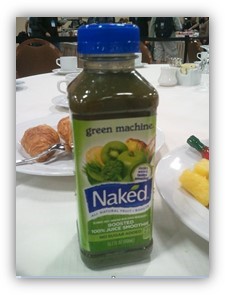
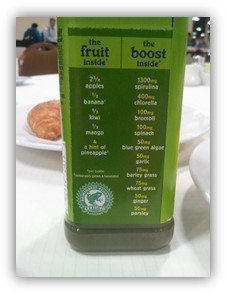
The day started as usual with breakfast, this was different though…no bacon. Who can live without a good stack of bacon at breakfast? 😉 Today they also offered a drink that was new to me, a green juice…see for yourself..

Spinache and broccoli? Grass??

It was ok I guess…but one was enough. After breakfast I had as the first session for the day a session on SSRS:

Running Reporting Services in SharePoint Integrated Mode: How and Why
(Spc199) Riccardo Mutti

Very good walkthru of setting up Reporting services in Integrated mode, both on SHarePoint 2010 and SQL 2008 R2 and on SharePoint 20103 with SQL 2012.
We also got to know what is good with using integrated mode instead of native, and what makes Microsofts integrated mode real, not compared to aothers that claim to have SharePoint integration. Tings like using built in security and that existing features can be utilized.

It was a very good walkthru and I will probably use the session recording as a good guide, but it could have been better as well, Riccardo used a demo Environment with Everything on the same box, meaning no kerberos and no permissions, which really are the things that make SSRS hard…
We did get to see the new 2013 Service Application model, whach will make SSRS easier to comprehend.

I got a good explanation as to what using a trusted account means, that was good. I Think that many customers and users can make do with a trusted account and thus not have to go thru all of the painstaking issues of setting up the environemnt to support kerberos.

The differnces:

The 2010 with 2008R2 model.

The 2013 with 2012 model.

Interensting stuff.

Next session, a customer session.

Customer Showcase: Telenor and Search with SharePoint
(SPC050) Andreas Hogberg, Denis Heliszkowski, Marius Pedersen

Andreas Högberg from Telenor, a Norwegian telecom Company explained how they quickly moved to use SharePoint 2013 search to get a better result even from their existing 2007 environment.
The end goal was to move completely to 2013 and do that without any ciustomizations, something which 2013 offered as a possibility.

The current global SharePoint 2007 environment had 171 customizations, the new SharePoint 2013 farm had 0(zero).

The plan was to have the two Environments coexist, then step by step move data from 2007 to 2013.

One interesting thing was the use of IaaS, Azure and Infrastructure as a service, they put all of their test and demo Environments there to save Money and time, and the environemnt did at its peak use 300+ cores in the cloud model.

Interesting session, nice to hear from a ‘real’ customer.

With on the session were two Consultants from MCS. Since most of the Project was done under the RDP program, they had MCS in on it to get the knowledge and inside help only MCS could offer.

That was it, last session for me.

I spent some time after that at the Exibit hall, talking to partners and perticipating in the raffles…
I did actually win a Windows 8 phone! Thanks Nintex!! I really love what you do! (Really, they do great workflows!)

I did not win the Ducati Monster motorbike that AvePoint gave away today…that Went to Another happy gentleman…

A few hours of shopping at the Premier Outlet North and I’m ready to go home. I’m flying home on the early bird tomorrow!

This is Thomas Balkeståhl signing out from the 2012 edition of the SharePoin t Conference for the last time. It has been great! I recommend going to everyone who havent been here and that works Close with SharePoint. It’s a uniqe opportunity to get knowledge and insight that you can’t really get anywhere else in the world.

The Mandalay Bay Hotel

Part 1 of this report
Part 2 of this report
Part 3 of this report
Part 4 of this report
Part 5 of this report


_________________________________________________________

Enjoy!

Regards

Twitter | Technet Profile | LinkedIn

SharePoint Conference 2012 in Las Vegas report part5


Hi friends.

Wednesday, third Session day! Today is the first Spencer Harbar day…

Another day with all sessions, then after that Ask the Experts Night. Nice…

I started out with the obvious selection this day. Spencer Harbar on UPS. For those of you who don’t know that name. He is the GOD on UPS, he has probably saved more UPS installations than anyone else.

User Profile Synchronization Best Practises in SharePoint Server 2013
(SPC245) Spencer Harbar

Spencer talked about the new and improved UPS in SharePoint 2013, what really is new (because a lot isn’t) is the 3 modes you can choose between.
-AD Import (That was available in SharePoint 2007 has been reintroduced and improved)
-UPS
-Custom

The reintroduced AD Import probably does what the majority of all customers want, a simple synch of user profile data to SharePoint.
It is import only and simpler than UPS, but it gets you the basics and more.
The Profile data is even entered into the Managed metadata Term store. Really nice.
Simple to configure and really a nice new option.

UPS, same as before, the real deal.

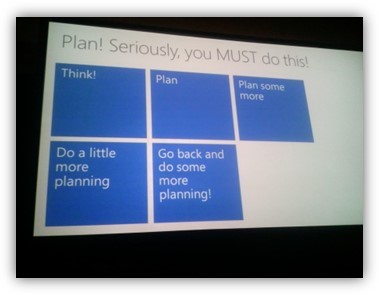
Planning!

All in all, a really great session that gave a lot of good info and most of all, hope, that UPS will be better this time.
And, Spencer Harbar is the man, no question!
See his blog here: http://www.harbar.net/

Migrating to SharePoint online in office 365 – strategy and best practices
(SPC152) Phil Cohen, Kimmo Fors

Again, a very good session. Things to think about from two Consultants from Microsoft Consulting Services. Really valuable content, experiences from real migrations that is hard to come by.

Key, same as with UPS and Everything else, planning!

Planning and Creating well designed Intranet Sites in SharePoint online
(SPC015) Randy Drisgill, john Ross

This was not really what I was hoping for, but still a very good session. What to Think about before setting up your Intranet in the cloud. How to make it useable and to look good. Again…plan plan plan…:-)

They started of with a few numbers:
Of all Projects setting up SharePoint the following is actually true:
62% over time
49% over budget
28% do not fit requirements

Proper planning could have made them all 100% successfull.

Deep dive to plan and Prepare for your users to interact with SharePoint from their Mobile devices.
(SPC164)

A very good Eye-opener on what can be done to make the Smartphone users experience better or even good. The new default Mobile view in SharePoint teamsites is really good. Try it out. No more basic text…
With apps coming out, like the Office hub and the SharePoint news reader, it will be a good offering to SmartPhone users.

Customizing the way SharePoint 2013 looks.
(SPC065)

A session on theme’ing and branding in SharePoint 2013. A really good session that showed us how to build your own themes and theme colors and also masterpages and css. The story on branding in 2013 just got a lot better.

Ask the experts.
The traditional ask the experts evening shared it with the exibit, all partners were in Place and showeed their solutions and companies to all that were interested. I spent some time today here at lunch as well and by now, it feels like I have seen most and talked to the ones I am interested in.
I got to talk to the creator of passphrases in SharePoint (Sean Livingston) and ask him if they were needed…(See privious post)
He unfortunately took it the wrong way and got almost upset…I still believe though, even after talking to the father of the Farm PassPhrase, that it is not really needed…it is more for percieved security, not security in itself…
And yes, do get me right, it is used!, to encrypt data in the db, but what I’m saying is that we don’t really need to see it or even know about it. It could just as well be hidden behind the scenes and be 200 chars long…in my opinion(until someone really proves me wrong…)

Ok, that was it. More fun tomorrow. That is the last day of the Conference and sessions are only planned for half the day. We’ll see what happens then.

I’ll try to keep reporting to all off you directly each and every day during the conference in order to share some parts of the great experience…

Stay tuned, this me, signing out, from day two of my SharePoint conference experience.

Part 1 of this report
Part 2 of this report
Part 3 of this report
Part 4 of this report


_________________________________________________________

Enjoy!

Regards

Twitter | Technet Profile | LinkedIn

Passphrases in SharePoint- why do we bother?


You all know about the passphrase in SharePoint (2010 and later) right? You name it during farm Creation using Powershell or the Config Wizard. It must be a complicated string of characters and it has to hold a certain length (exact requirements stated below)

Do we really need it?

Since you can replace the passphrase (Change your PassPhrase using PowerShell) without having the old one, all you need is to be a member of the farm administrators SharePoint Group. So…the use of the PassPhrase is what? You don’t need to save it since all you have to do when it is required (join farm) is to change it…and if you have the passphrase, you still have to enter the farm account (Database Access Account) username and password, so you still need the permissions…

The Passphrase in SharePoint 2013 Preview is described as:
(From the ‘Deployment guide for Microsoft SharePoint 2013 Preview’)
Although a passphrase resembles a password, it is usually longer to improve security. It is used to encrypt credentials of accounts that are registered in SharePoint 2013 Preview. For example, the SharePoint 2013 Preview system account that you provide when you run the SharePoint Products Configuration Wizard. Ensure that you remember the passphrase, because you must use it every time that you add a server to the farm.

Ensure that the passphrase meets the following criteria:

  • Contains at least eight characters
  • Contains at least three of the following four character groups:
    • English uppercase characters (from A through Z)
    • English lowercase characters (from a through z)
    • Numerals (from 0 through 9)
    • Nonalphabetic characters (such as !, $, #, %)

So…now that you have read all this, do we really need it? Why bother? Is it one more layer of real security or more more layer of persieved security?

-It’s easily replaced/reset (see Change your PassPhrase using PowerShell)
-You still need the farmaccount credentials to join
-It’s seldom used and thus easily lost (in real life! yes)
-For the encryption purposes, SharePoint could use a random key that you never have to see or know about…
_________________________________________________________

Please Comment!

Regards

Twitter | Technet Profile | LinkedIn

Drop everything – SharePoint 2013 IT Pro and Developer training materials released…


SiteIcon2013

Ok, now we’re talking…

SharePoint 2013 IT Pro and Developer training materials released
http://blogs.msdn.com/b/vesku/archive/2012/07/17/sharepoint-2013-it-pro-and-developer-training-materials-released.aspx

Loads of good stuff available, 14 streamed video modules, everything also available as pptx.

Too bad I’m on holiday…now…the real FUN BEGINS!


Enjoy!

Regards

Twitter | Technet Profile | LinkedIn

SharePoint 2012/2013 Wishlist – Dear Microsoft…


SharePoint 2012/2013 Wishlist…dear Microsoft…

Ok, this time I would like to add a post intended for Microsoft and the product group, but also for all of you SharePoint fans out there.
I guess that you have like me and like this time my dear coworker Mattias Gutke who cowrote this list, thought over time that this and this should be done better or added in the next version.

However, I do not know of any good way to get this knowledge across to the product group, or even if there is a way to email someone. Perhaps there is for the MVP’s or the TAP/TechPreview community but for all of us mere mortals??
During my 8+ years at Microsoft there was always talk about the emailaddress mswishlist@microsoft.com. I still today do not know if it even existed or if it was monitored.

So, I’ll just post the list we have gathered over time here and my hope is that it somehow will make it’s way to the top. Please aslo feel free to add your own reasonable requests as a comment and I will be happy to review and possibly add it to the list.

Ok, here we go! The list of features, functionality, added/fixed settings in the next version of SharePoint, SharePoint 2012/2013 (working title SharePoint v. 15)

Dear Microsoft, this is what we want:

  • In CA, add a setting for a common Farm wide prefix for all databases. Skip the guid from the gui if this is set.
    Example: Farmname_databasetype_function
  • Add a possibility to audit all Central administration settings, even when changed from PowerShell. Audit data should be collected at a separately named database server and database(can be the same as the farm SQL)
  • If a service or feature needs to be started in order to create a service application or other objects in CA, prompt to start them.
  • Add a link to the Search administration from the start page in CA when Search is installed.
  • Add a ‘Verify Kerberos setup’ that can access data and verify if a system are configured properly to operate using Kerberos authentication.
  • Add a wizard for setting up Claims authentication from live.com(and possibly other external authenticators)
  • Record actions taken in CA as Powershell commands so that they can be re-executed in another farm or again in the same farm.
  • Save farm settings to xml+wsp, then import settings to new farm. An improved semi-automated way to transfer a test environment to prod or prod to test. Import will implement the exact same settings as in source farm complete with service applications and solutions. Acount and unique settings will be editable easily in the xml.
  • Correlation id link to logfile for admins, even a linenumbers would be great.
    Also for the end user experience they would be able to send (with a button) that id & link to an admin. with the option to write error/problem desctiption. with choices??? i.e Minor incident, Critical for business etc.
  • Easier to get UPS up and running in some way. installed default? but not activated/configured feature/service
  • Much easier navigation within CA, everything is still a mess. Hate to se a couple of settings as a preview but when you go into i.e Monitoring you will find even more, show everything at the beginning or nothing exectp the title of the section.
  • Visual Farm topology in CA would be nice to have, with clickable areas to get more information.
  • When copy a item to another library within the site collection a browse button should be available, you should not have to specify a URL!!!
  • Clean up permission pages, and default should only be 3 sharepoint groups, visitor, member owner
  • Add support to export/import termstore synonyms.
  • Add support for Managed metadata/Termstore in SharePoint Workspace.
  • Allow the ability to enter metadata on multiple-document upload
  • PDF-ifilter out of the box!
  • Auto-remove from SharePoint if AD-object is terminated/removed.
  • You should not have to have sharepoint installed on your VS dev machine, connect and publish to any external sharepoint farm. It should be enough to install an SDK for SharePoint.
  • A way to in the GUI or Visual Studio, select the components that you want to be part of a new Web Template/Site Definition.
  • If a new update/CU/SP is available for each product/feature/service, In the upgrade/version/patch level page in CA. Link to the correct place to get that patch/CU/SP, dont want to google it up every time!!!
    One place to select update farm (select in list to what cu/SP)!
  • Same for Language packs as for CU/SP, one place to select in CA and the languages should be downloaded and installed.
  • Export some configuration in CA as a powershellscript
  • Add an extended default example metadata classification tree to the term store.
  • Add easier export import of metadata from the term store.
  • built in warm-up-script functionality.
  • Built in Scedule task functionality.
  • Under site settings, red titles are features available but not enabled due to some feature that needs activation like (in red) Navigation – SharePoint Server Publishing Infrastructure feature. Once activated the feature turns blue and the text shoowing witch feature needs to be activated is gone.
  • Or, as above but with most settings available but if the feature is not enabled, you get a dialog that says that this feature will be activated, do you wish to go ahead?
  • Easier cutomization of the ribbon, checkboxes of what options should be available, today it’s too overwhelming experience for endusers. also a tab for admin/owner for the ribbon would be nice to be able to select all non-endusers settings.

For the rest of you – Enjoy!

Regards

  (with great contributions from Mattias Gutke – Enfo Sweden)