In a hybrid environment where an AAD Connect is configured to sync the onprem/classic Active directory and its users to Azure Active Directory, the expire date property in AD is not synced.
This in itself is not that big of a deal, but the fact that an expired user in AD, that is blocked for use and login onprem, is fine to use in the cloud environment. It can be used in Office 365, in Azure, in other connected Cloud services/SaaS applications out there.

This is a fact, and it not good that a user that is considered to be deactivated, is still able to access an organizations services in the cloud. The example is an external consultant that in a project has a limited time on the AD Account, and in a onprem environment, an expired account = a blocked account.
With AAD Connect and a hybrid AD setup, this is untrue…
How to fix this? There are many solutions available if you have a look out there, good and bad, there are ways to configure AAD Connect to sync the expiry date and then build something to handle it in the Azure AD environment.
I will here suggest the simplest solution to a complicated problem…
Solution:
The ‘Enabled’ property of a user account is one of the properties that are always synced to Azure AD. This is on an active account set to TRUE. Setting the enabled property to FALSE disables the account. You can verify this in AD Users & Computers and see that the Account disabled is checked. So, using this disables the account in AD, is synched to Azure AD, and causes the account to be disabled in Azure AD as well, good!
In order to set Enabled to FALSE when the Expire date has passed, we need something to do it for us.
The below PowerShell script does this, it filters all users on only those which are still active AND has a passed expire date. (Add more or other filters as appropriate)
Schedule this script to run once a day and you will solve the problem.
In addition to just solving the problem, the script will do some logging for you, so that you can see which users are actually disabled by this script and which have some other reason.
$LogPath = 'C:\Scripts\DisableExpiredAccounts'
$Now = Get-date

function LogToFile ($LogPath, $LogText){
if(-not (Test-Path $LogPath)){
New-Item -ItemType Directory -Force -Path $LogPath
}
(Get-Date -Format "yyyy-MM-dd HH:mm").ToString() + " | " + $LogText | Out-File $LogPath\ExpiredUserLog.txt -Append -force
}

$AllUsers = Get-ADUser -filter {Enabled -eq $True -and accountExpirationDate -lt $Now} -Properties *

If ($AllUsers.count -gt 0){
LogToFile $LogPath ("Number of expired users found: "+ $AllUsers.Count)
}

foreach($user in $AllUsers){
$UserExpiryDate = (Get-Date ($User.accountExpirationDate) -Format "yyyy-MM-dd HH:mm").ToString()
try{
#Disable the account
Disable-ADAccount $User.SAMAccountName
LogToFile $LogPath ("Expired on: " + $UserExpiryDate + " | Disabled: " + $User.UserPrincipalName + " - " + $User.DisplayName)
}
catch{
# If disable failed, log
$ThisError = $Error[0]
LogToFile $LogPath ("Failed on: " + $UserExpiryDate + " | User: " + $User.UserPrincipalName + " - " + $User.DisplayName + " - - - ERROR!")
LogToFile $LogPath ("Error message:" + $ThisError)

}
}
Done!
Now, as this has to run on a regular basis, and we don’t want to add any additional infrastructure to our onprem environment (Even if its in Azure), I recommend putting it on the actual AAD Connect VM.
Put the script in any folder suitable (ex. c:\scripts\) as DisableExpiredAccounts.ps1
Open Task Scheduler on the server
Add a new task

Call it something descriptive (DisableExpiredAccounts)
Add a ‘run as’ service account (with permissions to read AD and change user properties)

Add a trigger, scheduled to run once every day at 7:00 AM
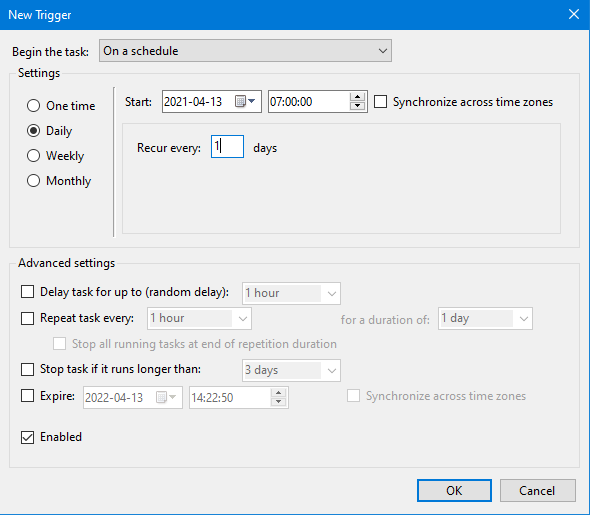
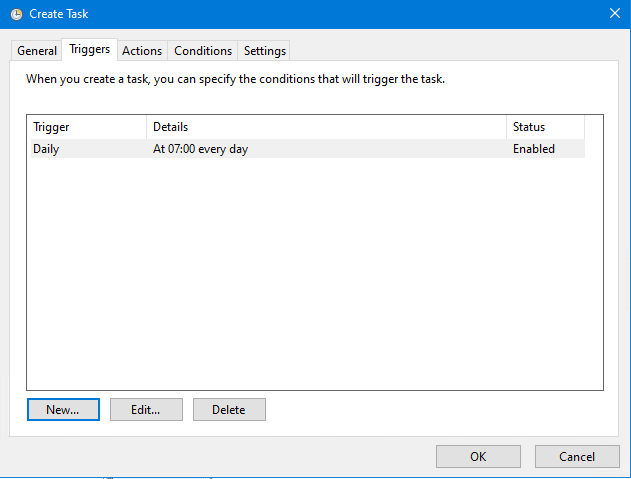
Add an action, run the program PowerShell.exe, add the argument ‘C:\Scripts\DisableExpiredAccounts.ps1’

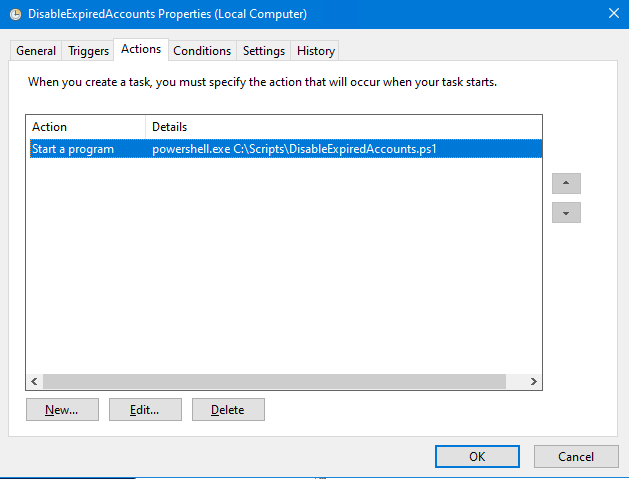
Make sure it is enabled, and save the task.
Test run it to make sure it works.

The log will show you if there were any changes made.

Done!
Follow this up and verify that the user gets disabled in your Azure AD as well, just to make sure.
https://docs.microsoft.com/en-us/powershell/module/activedirectory/disable-adaccount?view=windowsserver2019-ps
https://myserverissick.com/2019/01/how-to-make-azure-ad-connect-disable-expired-accounts/

___________________________________________________________________________________________________
Enjoy!
Regards

Thomas Odell Balkeståhl on LinkedIn